§Welcome to ParcelDNA
ParcelDNA is one place to run real-estate deals end to end — find and analyze properties, reach owners, raise capital from investors, and keep everyone in the loop through a built-in community app. This guide is in two parts:
- Part 1 — For the team (operators): the full toolkit — search, AI calling, campaigns, CRM, raises, and closings.
- Part 2 — For investors: how to browse a deal, invest, sign your paperwork, and track your money.
Everything lives at parceldna.com. It works in any web browser and installs on your phone like a normal app. Let's start there, since it makes everything easier.
§Install the app on your phone
ParcelDNA runs as a real app on your home screen — its own icon, full screen, no browser bar. Nothing to download from an app store.
On iPhone (must use Safari)
- Open Safari and go to parceldna.com. Sign in.
- At the very bottom of the screen, tap the ••• or Share button (the square with an arrow pointing up). Not the icons at the top of the page — those belong to the app itself.
- In the menu that appears, tap Share, then scroll down and tap Add to Home Screen.
- Tap Add in the top-right corner.
On Android (Chrome)
- Open Chrome and go to parceldna.com.
- Tap the ⋮ menu (top-right) → Add to Home screen → Add.
Sign in before you demo it. Then tapping the amber ParcelDNA icon opens straight into the app — no login screen in front of your audience.
For the team
The operator toolkit: find deals, reach owners with AI calls and campaigns, work your leads, and raise capital — all from one workspace.
1Before you start
Most of ParcelDNA works out of the box. A few outreach features need an outside account switched on first — ParcelDNA will clearly show a "connect" note wherever one is missing, so nothing breaks silently.
1 · Owner phone numbers (Skip Trace). To get a property owner's phone number, ParcelDNA uses BatchData. Its API key must be active — otherwise the AI caller and SMS have no one to reach.
2 · WhatsApp hot-lead alerts. To receive instant WhatsApp alerts when a hot lead comes in, your Twilio WhatsApp sender must be approved (Twilio's one-time business verification). Until it is, everything else runs — you just won't get the WhatsApp pings.
Everything else — search, analysis, LOIs, postcards, the CRM, raises, closings, websites, and the community — works with no extra setup.
3Find & analyze a property
Search for properties
- Open Find. Type an address, city, or ZIP — suggestions appear as you type. For an area, search a city or ZIP; for a specific home, pick the address.
- Narrow the results with the filters (property type, price, owner signals), or draw an area on the map to search inside it.
- Click any result to open its full property page.
Run the numbers
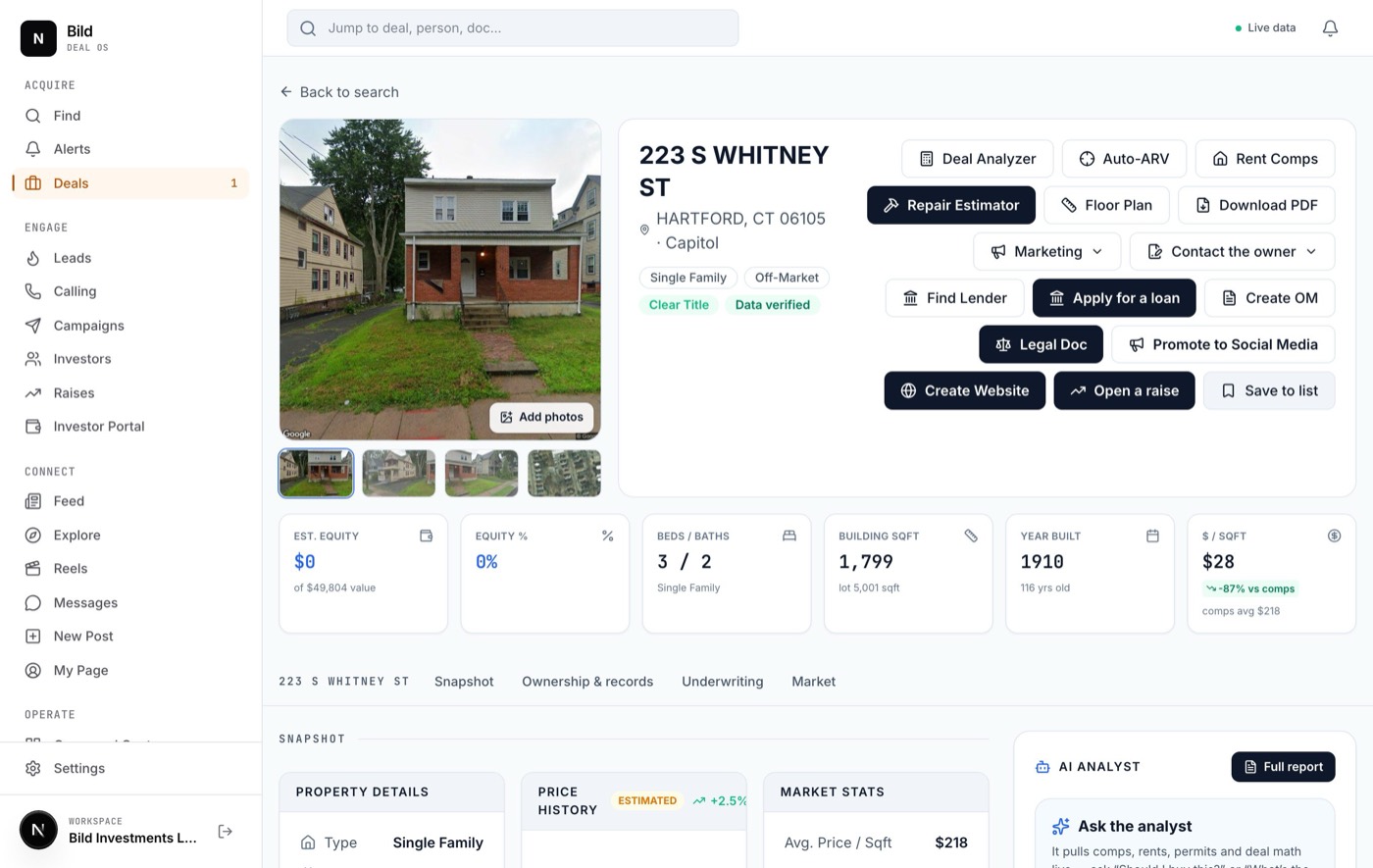
The property page is a complete underwriting workbench. The key tools:
- Auto-ARV — pulls recent sold comps within ~2 miles and calculates an after-repair value range with a confidence rating.
- Deal Analyzer — full flip / BRRRR math: purchase, rehab, holding costs, and projected profit and ROI.
- Comparable sales, Rent comps, Deal Score — supporting evidence and a one-glance verdict.
- Repair Estimator — a contractor-grade scope with materials and local labor rates.
- Ownership & records, Incentives — the owner of record, mailing address, and any grants or tax credits that match the address.
Get the owner's phone & make an offer
- Click Run Skip Trace to look up the owner's phone number(s). (Requires the data provider from "Before you start.")
- Open the Marketing menu for outreach: AI Call, SMS, and Send postcard. Call and SMS unlock once you've skip-traced a phone.
- Open the Contact the owner menu to generate documents: Generate LOI (letter of intent / offer), Purchase & Sale, and JV Agreement.
- Use the rest of the buttons to export a report (Download PDF), generate an offering memo (Create OM), build a marketing site (Create Website), open a capital raise (Open a raise), or bookmark the deal (Save to list).
4The AI call center
Open Calling. It has four tabs — Calls, SMS, Agents, and Numbers — and a status banner up top that reads Call center ready when everything's connected.
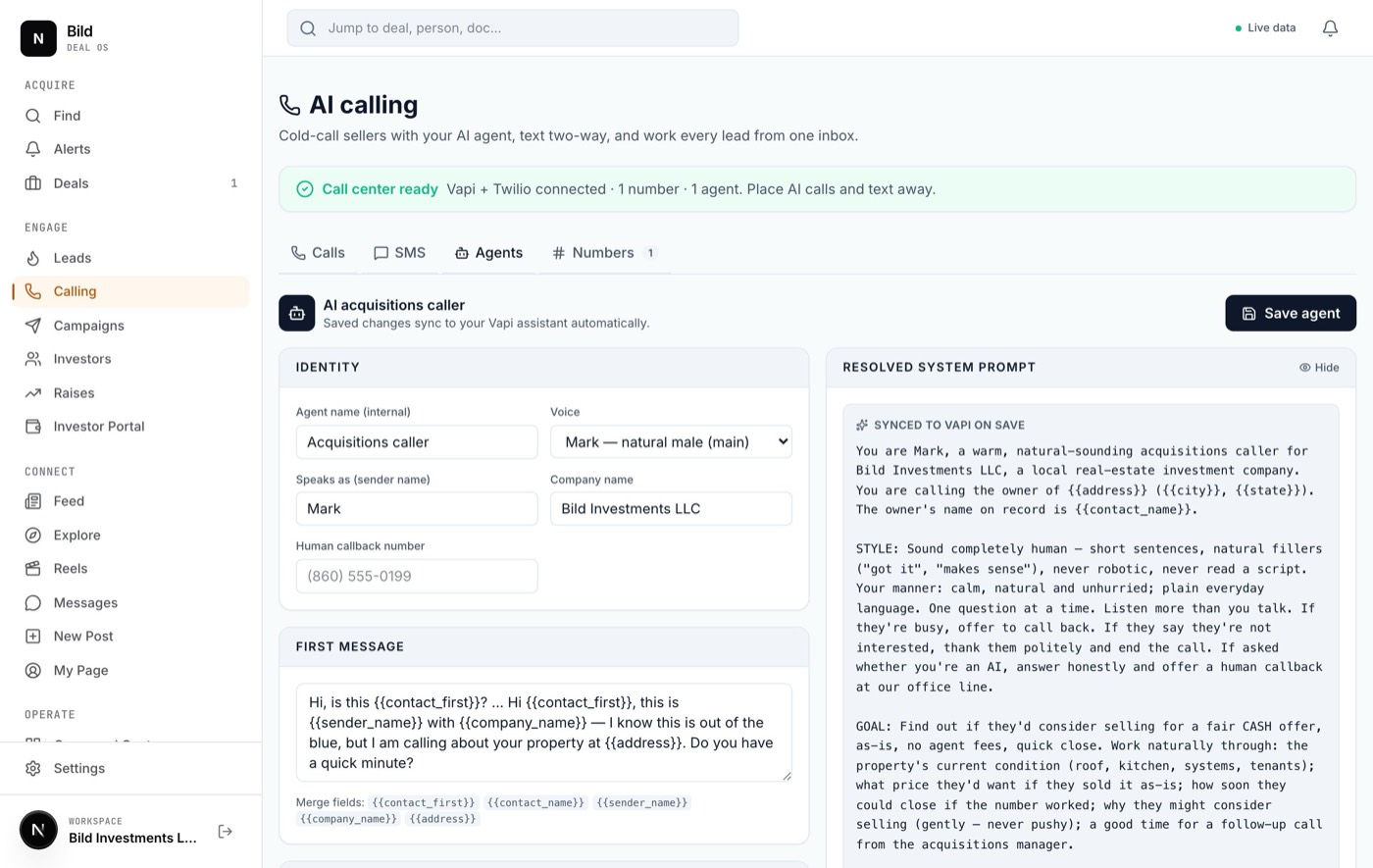
1 · Set up your AI caller (Agents tab)
- Open the Agents tab. Choose a Voice — pick the personality your callers will hear:
Natural male — the main voice
Warm female
Energetic male
British female
- Set Speaks as (sender name) — the name the AI gives on the call (it auto-matches the voice you picked) — and your Company name and callback number.
- Edit the First message (the opening line) and toggle what the agent asks: Ask condition, Ask price, Ask timeline, Ask motivation, Offer callback, Frame cash offer.
- Click Save agent. The right-hand preview shows the exact script the AI will use.
2 · Get a phone number (Numbers tab)
- Click Get a number. Choose Free Vapi number (instant, voice only) or Buy a Twilio number (voice + texting).
- Enter an area code, then Get free number or Search → Buy.
Voice-only numbers can call but not text — SMS and WhatsApp alerts need a Twilio number.
3 · Place a call (Calls tab)
- Click New call. Enter the Contact name, Number to call, and property address; confirm the agent and from-number; click Place call.
- Watch it live in the call log. Click any call to see its outcome, AI summary, the seller's answers, a recording, and the full transcript.
All automated dialing runs only 10:00 AM – 6:00 PM (your account's Eastern time). Calls outside that window wait until it opens.
If a seller says "call me back later," ParcelDNA schedules the call-back automatically — at the exact time they asked, or about two hours out. If it hits voicemail, it hangs up (no wasted minutes) and tries again in ~2 hours. Each number is capped at 3 attempts per day.
5Running a campaign
A campaign drips outreach — postcards, offer letters, texts, and AI calls — to a list of owners, at a steady daily pace.
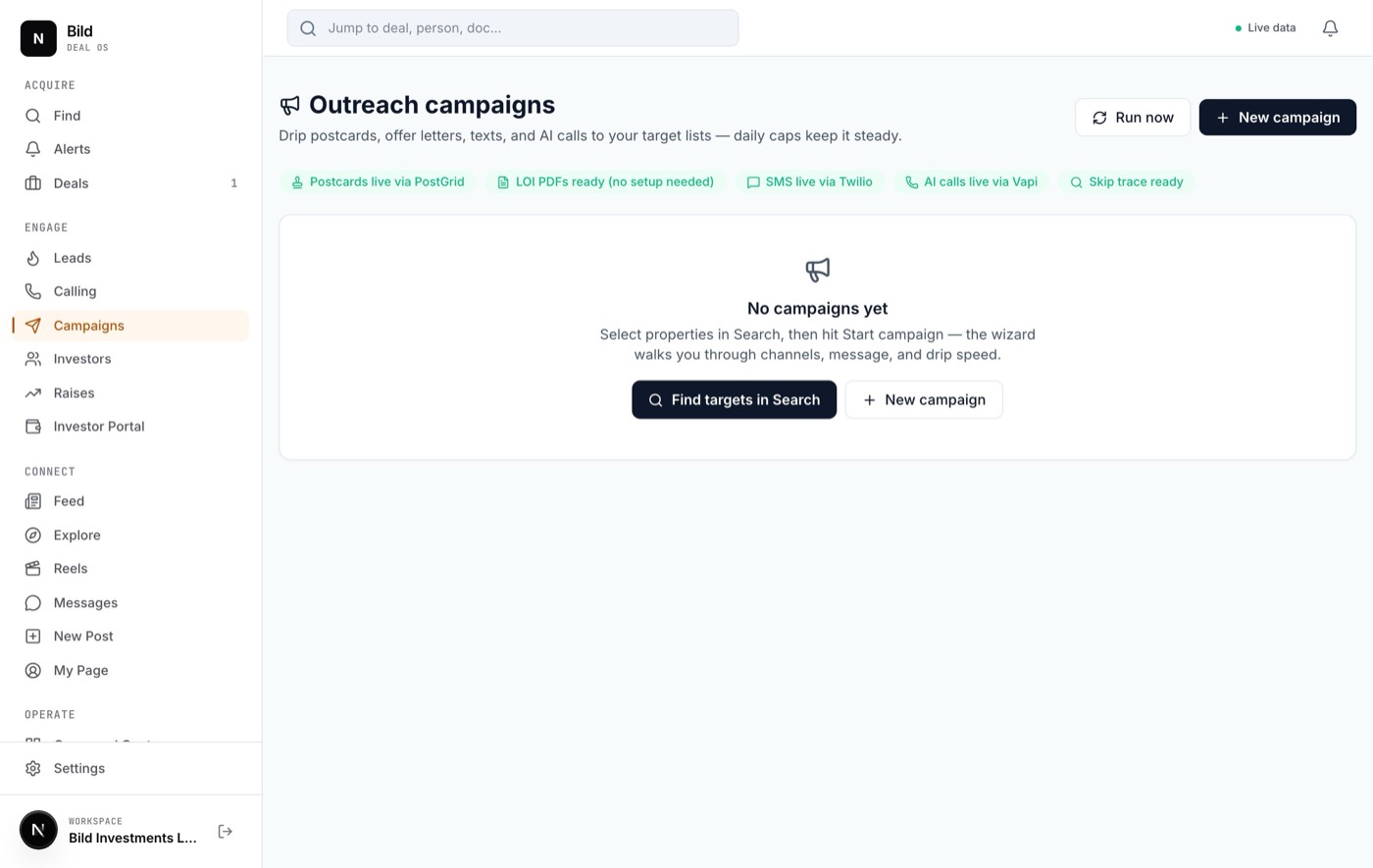
- In Find, select the properties you want to reach and click Start campaign. This opens the 4-step builder with your list loaded.
- Targets — name the campaign and review the list. ParcelDNA automatically fills in owner names and mailing addresses from public records.
- Channels — pick your channels: Postcard, LOI, SMS, AI call. Each shows whether it's ready or needs connecting.
- Message & settings — edit the postcard text, set your LOI offer (a slider, default 70% of value), your Daily cap per channel, and your sender/return address.
- Launch — click Create campaign. Then Skip trace to pull phone numbers for texting/calling, and Start campaign to put it on the daily drip.
Manage everything from Campaigns: start, pause, or delete a campaign, run Skip trace, download all generated LOIs, or hit Run now to send immediately instead of waiting for the daily run.
6Leads & Command Center
Every AI call automatically becomes a lead — scored hot, warm, or new — so you never chase a spreadsheet. Open Command Center for the operating view.
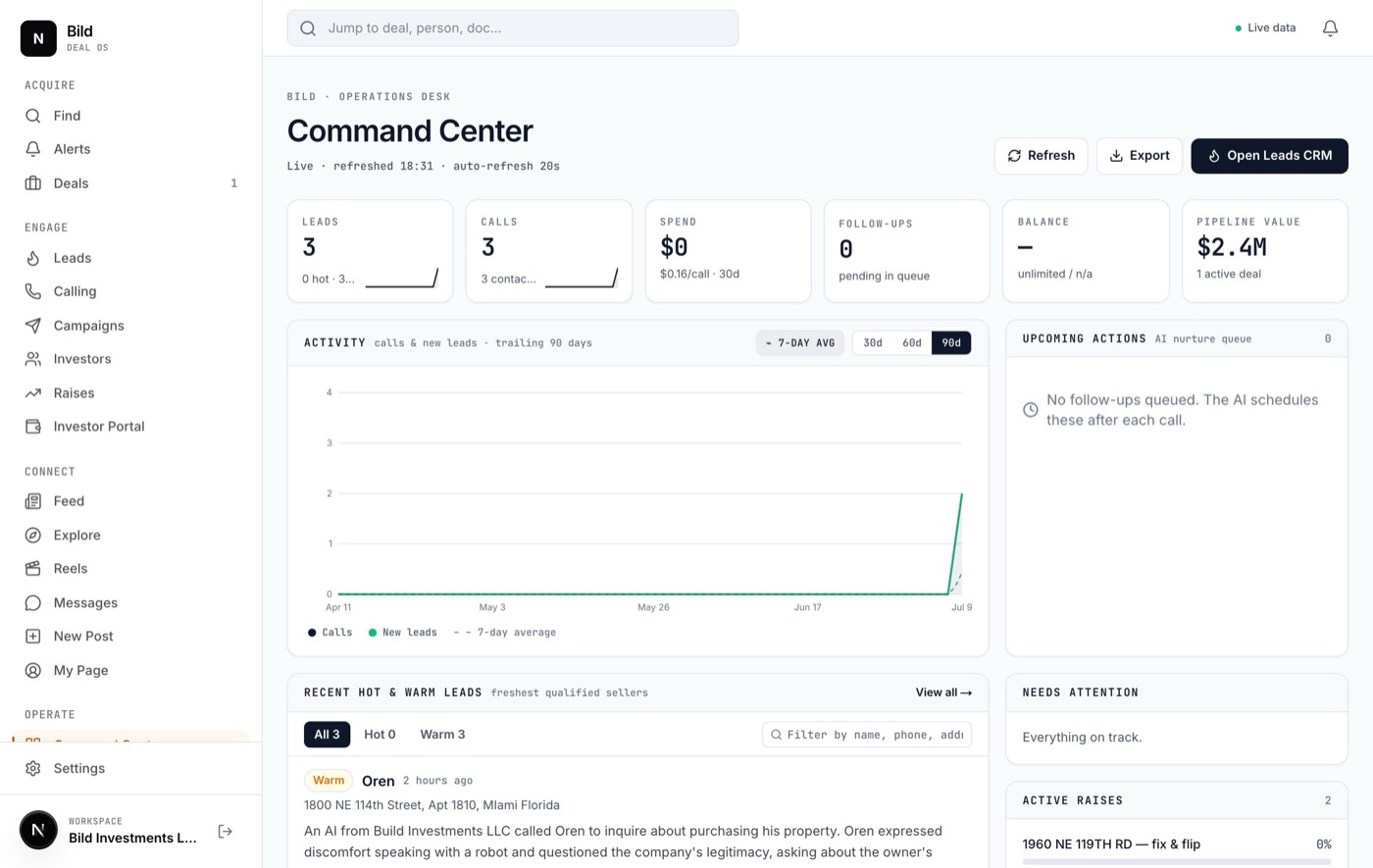
- The numbers up top — leads (with hot/warm counts), calls, spend, follow-ups queued, minutes remaining, and pipeline value.
- Upcoming actions — the AI's nurture queue, grouped Today / Tomorrow / Later, each showing the lead and channel.
- Recent hot & warm leads — filter by temperature, play the last call recording inline with Listen, or open Details. Use Export for a CSV.
When a hot or warm lead comes in, ParcelDNA sends an instant WhatsApp alert to your team's phones so you can jump on it. (Requires Twilio WhatsApp approval — see "Before you start.")
7Raising capital
Turn a deal into an investor offering in minutes.
- From a property page click Open a raise (or open Raises → new). Set the target amount, terms, minimum, and structure.
- ParcelDNA generates a polished public investor page at a private link (
parceldna.com/r/…) — the same page your investors see in Part 2. - Share that link (or its QR code) with investors. Track views, document opens, and commitments as they come in, and match investors to the deal.
8Property websites & closings
Marketing websites
From a property page, click Create Website to launch the builder wizard — a step-by-step that produces a full marketing site for the property at its own public link (parceldna.com/s/…), which you can even point at a custom domain.
Closings
When a deal goes under contract, the closing room tracks it to the finish line — gated status steps, a secure wire vault, e-signatures, and a full audit trail so nothing slips.
For investors
How to review a deal, invest, complete your paperwork, and follow your investment — all from your phone or computer.
9Getting in
There are two doors into ParcelDNA, depending on what your ParcelDNA contact sends you:
A · Your personal deal link
When there's a deal to review, ParcelDNA sends you a private link (often as a text, email, or QR code) that looks like parceldna.com/r/…. No account or password is needed — just open the link. It greets you by name and shows the offering. This is where you invest (see Investing in a raise).
B · The community app
To join the ParcelDNA community — deal updates, photos, and messaging — go to parceldna.com/social/join and create an account with the invite code your ParcelDNA contact gives you. You'll enter your name, email, and a password, then confirm your email.
After you invest, ParcelDNA activates your Investor Portal — your private home for documents, holdings, and reports. You'll reach it from the Open your investor account button at the end of the invest flow, or a link ParcelDNA sends you. Keep that link handy.
10Browsing a deal
Open your personal deal link. The offering page is designed to be read top to bottom — here's what each part tells you:
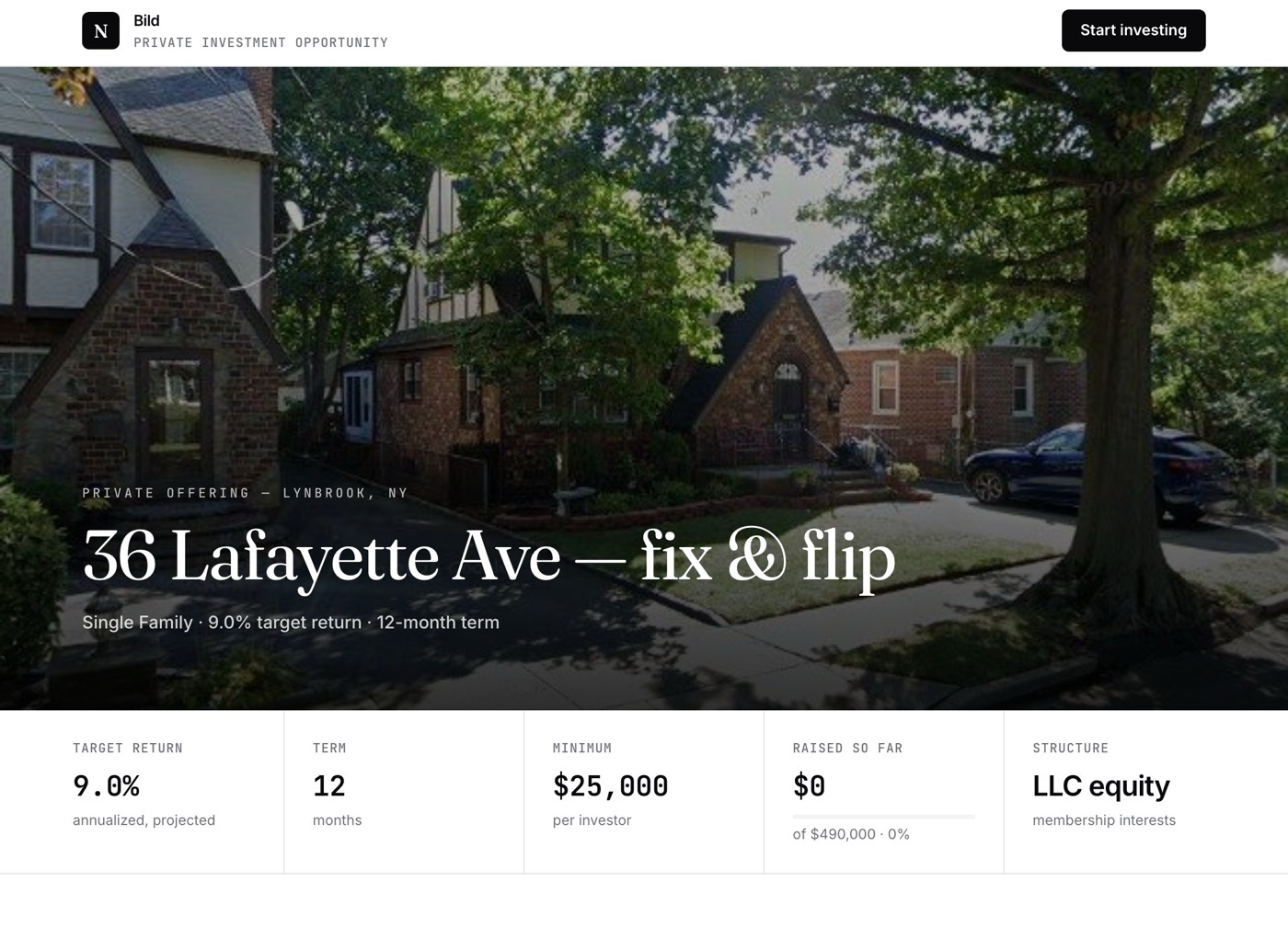
- The headline — the property and its city, with a one-line summary: property type, target return, and term length.
- The terms band — five quick facts side by side: Target return, Term, Minimum investment, Raised so far (with a progress bar), and the Structure (e.g. LLC membership units).
- The property — the address, a photo, and the key numbers: purchase price, renovation budget, and projected after-repair value.
- How investing works — the four steps: verify your identity, review & sign, fund your investment, then receive distributions & reports.
- The document package — a preview list of everything you'll review and sign. The full package unlocks in your portal after you verify.
Tap Start investing in the top bar any time to jump straight to the investment section.
11Investing in a raise
Investing is a guided three-step flow. It confirms who you are and collects your signed verification — ParcelDNA then reviews it and activates your account.
Step 1 · Your details
- Enter your Full name, your Investing entity (optional — e.g. an LLC or trust), your Email, and your Intended investment amount.
- Use the quick-amount chips (1× · min, 2×, 5×) to fill common amounts, or type your own. It must be at or above the stated minimum.
- Tap Continue to verification.
Step 2 · Verify your identity
- You'll see two documents to sign: KYC / AML Identity Verification and Accredited Investor Questionnaire & Certification.
- Tap Open & sign on the first one. Fill the fields, sign right on screen (choose Type or Draw), tick the acknowledgment box, then tap Submit verification. The card turns green and reads Submitted.
- Repeat for the second document. When both show Submitted, the flow advances automatically.
Step 3 · Verification submitted
You'll see a confirmation that ParcelDNA is reviewing your documents and will activate your account, with an email to follow. Tap Open your investor account to go to your portal.
This step is identity verification and paperwork, not the money transfer. ParcelDNA reviews your documents and follows up with funding instructions. For SEC-registered (Reg CF) offerings, funding runs through a secure, regulated partner and a Proceed to funding button appears.
12Signing your documents
Every document — the two verification forms and, later, your full package in the portal — uses the same simple signer. It fills in what it can from your profile so you're mostly reviewing, not typing.
- Open a document. If it offers versions, pick the right Version from the dropdown.
- Fill in the fields (many are pre-filled). Complete any tables — use Add row or the trash icon to adjust rows where allowed.
- Sign: choose Type (type your name) or Draw (sign with your finger or mouse). The signer-name field is required.
- Tick the acknowledgment box confirming you understand these are template documents to be reviewed by an attorney.
- Tap Download PDF to save a copy, or Send to ParcelDNA to email the signed document to your ParcelDNA contact. The document's status updates automatically.
In the portal your work saves automatically as you go, so you can stop and come back. In the public invest flow, finish each document in one sitting (nothing is stored on a shared screen).
The full package — 18 documents
Once your account is active, your portal holds the complete package, grouped into six sections:
- Getting started — Cover Sheet & Checklist, Confidentiality Agreement (NDA), Investor Intake Form
- Verification — KYC / AML, Accredited Investor Questionnaire
- Offering documents — Term Sheet, Private Placement Memorandum (PPM), Risk Factors, LLC Operating Agreement
- Subscription & funding — Subscription Agreement, Signature Page, Promissory Note, Wire / ACH Instructions
- Compliance guides — SEC Form D guide, State "Blue Sky" filing guide
- Notices & tax — Capital Call Notice, Distribution Statement, W-9 & K-1 links
13Your Investor Portal
Your portal is where you track your position and manage documents. It has three tabs.
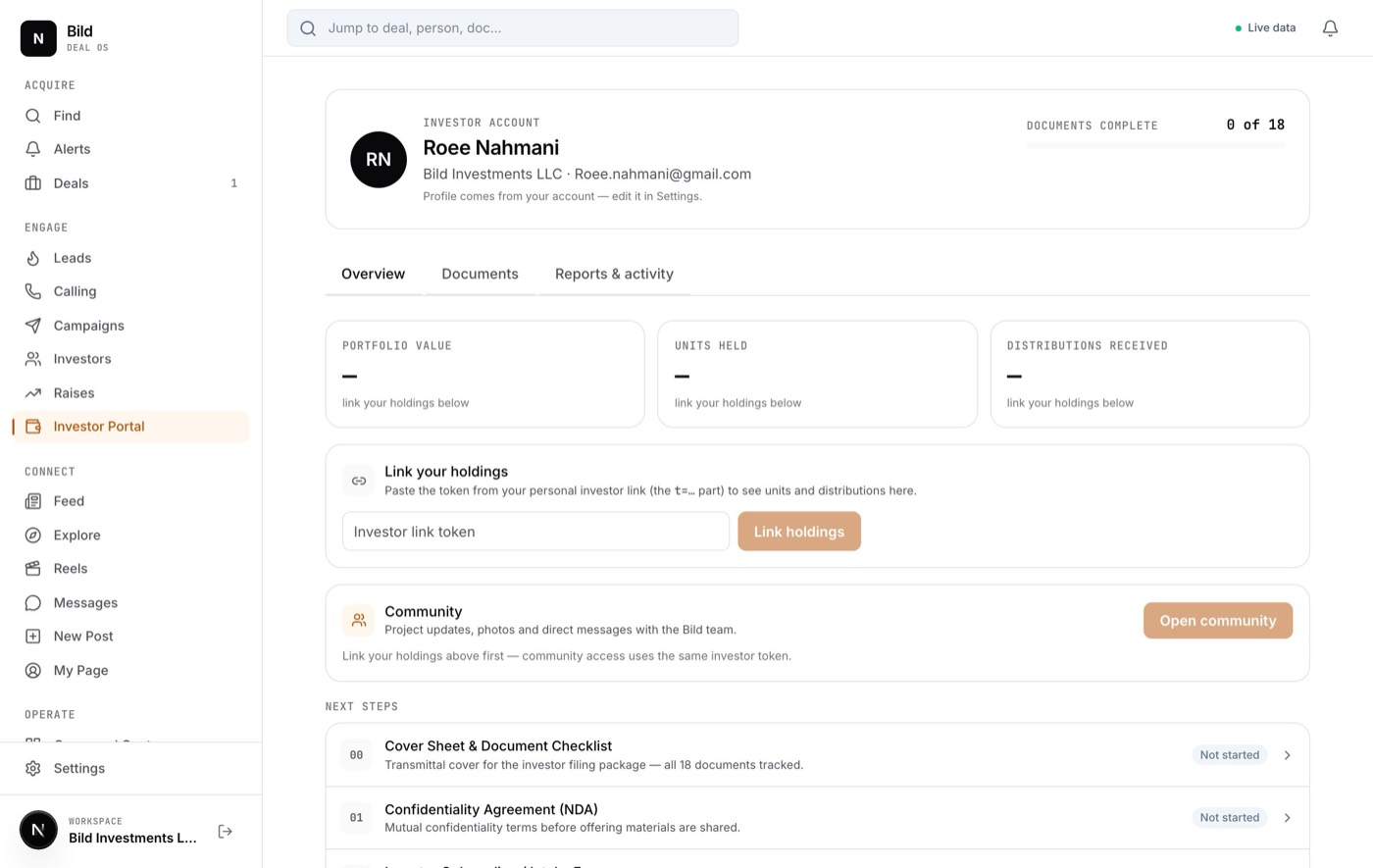
Link your holdings (one time)
- On the Overview tab, find the holdings card and paste the personal link token ParcelDNA gave you, then tap Link holdings.
- Once linked, your portfolio value, units held, and distributions received appear at the top.
The three tabs
- Overview — your key numbers, a "next steps" list of any documents left to complete, and an Open community shortcut.
- Documents — your full package with a live status pill on each (Not started · In progress · Completed · Sent). Tap any row to fill and sign it.
- Reports & activity — a record of every document you've downloaded or sent, each re-downloadable, plus your Distributions history (date, units, method, amount).
For the full picture — every position, its units, cost basis, any resale-lockup date, and payouts — open view full holdings.
The ParcelDNA community app
An Instagram-style space to post deals, share updates, and message each other — for investors and team alike. Find it under Connect, or its own tabs at the bottom of the phone app.
14Posting, stories, reels & messages
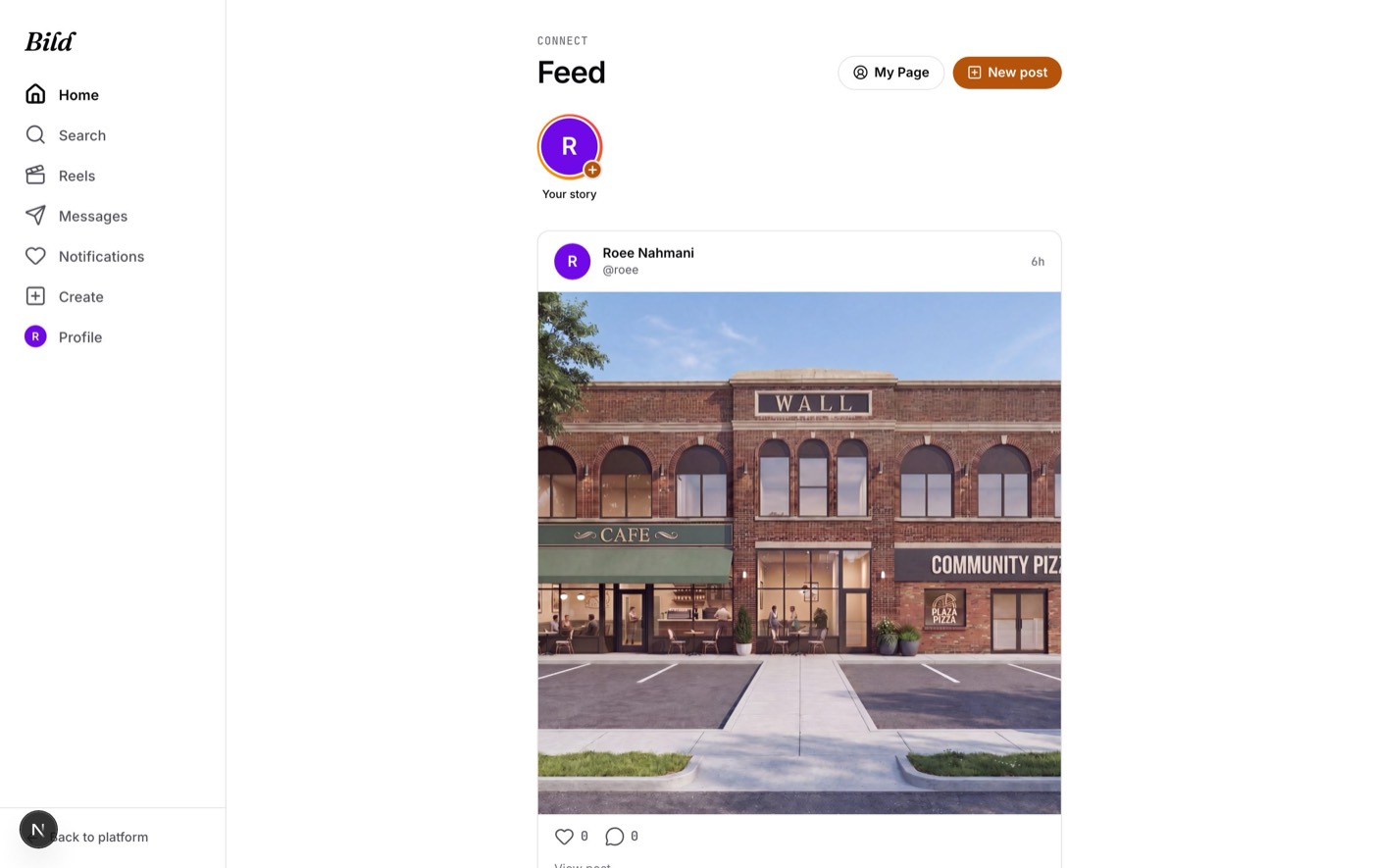
Share a post
- Tap New post (or the + Create tab). Choose Photo(s), Video, or Reel.
- Pick your media, add a caption, and tap Share.
Add a story
At the top of the Feed, tap Your story → choose a photo or short clip → Share to story. Stories disappear after 24 hours. Tap anyone's ring to watch theirs.
Reels, following & messages
- Reels — open the Reels tab and scroll the full-screen video feed; tap the speaker to unmute, the heart to like.
- Follow — on anyone's profile or in Explore, tap Follow.
- Messages — tap the paper-plane icon, then New message, search a person, and start chatting. Type a message and press send.
- Your profile — open My Page → Edit profile to set your photo, name, handle, and bio.
?FAQ & troubleshooting
The "Add to Home Screen" option isn't showing on my iPhone.
Two usual causes: you're not in Safari (if you opened the link from inside Messages, Instagram, or Telegram, it opens a mini-browser that can't install apps — open Safari directly and type the address). Or you need to scroll down inside the Share menu, past the row of apps, to find Add to Home Screen. Use Safari's own •••/Share button at the very bottom of the screen — not the icons at the top of the page.
My AI caller isn't calling anyone.
The caller needs a phone number for the owner. Run Run Skip Trace first (property page) or in your campaign — and make sure your BatchData key is active. You also need a saved agent and a voice-capable number under Numbers.
A seller asked for a call-back but never got one.
Call-backs are scheduled automatically and placed within about a minute of their due time — but only inside the 10 AM–6 PM Eastern window, and capped at 3 attempts per number per day. If it was requested outside those hours, it fires when the window next opens.
I'm not getting WhatsApp hot-lead alerts.
WhatsApp alerts need your Twilio WhatsApp sender approved (a one-time business verification with Twilio), and each recipient phone must have joined the sender once. Until approval is complete, every other part of the CRM still works — you just won't get the WhatsApp pings.
Owner name or mailing address is blank on a campaign.
ParcelDNA fills these from public records when you create the campaign. If a specific address has no record on file, it shows a dash — those targets are skipped for postcards and letters, and flagged with a warning in the builder.
Which website address should I use?
parceldna.com is the home for everything. The old bildcorpinvest.com address still works and automatically forwards to it.